Free image editor · runs in your browser
Circle it. Crop it. Shrink it. Send it.
The quick way to mark up a screenshot, blur out what shouldn’t be there, and get forty photos down to size — no account, and your pictures never leave this tab.
$0, foreverNo signupWorks offlineNothing uploads
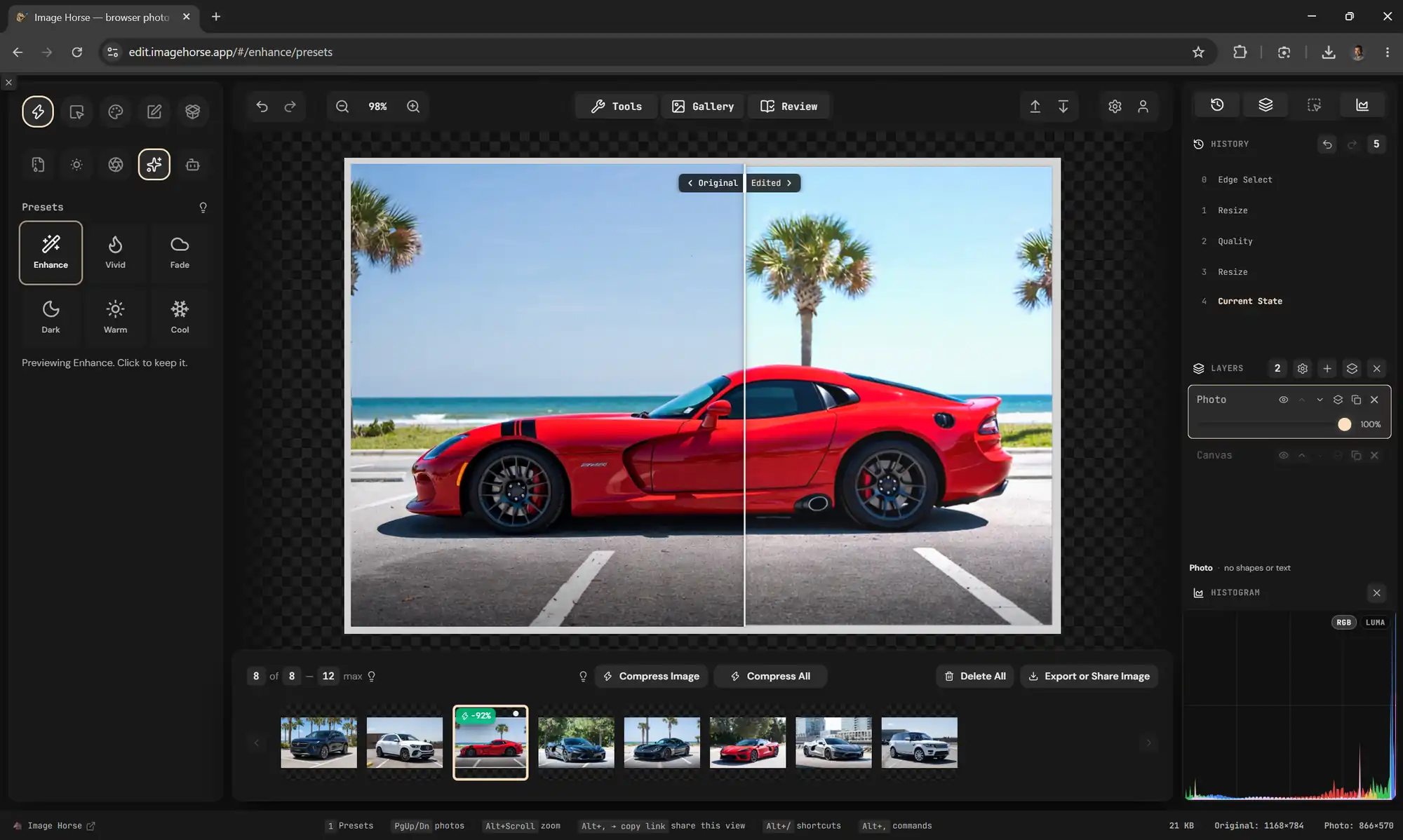
- Presets — preview before you keep.
- Original ⟷ Edited side by side.
- Compress All — every photo to your target size or smaller, one pass.
Aug 2025Sep 2026
17 Sep 20269 of 9
Today: presets you preview on the photo before you keep them, an Original / Edited split to see what changed, and a Viper shrunk 92% without leaving the tab.v8.79 ↗
Made for the jobs in between.
Not a darkroom. Not a design suite. Image Horse is for the five-minute picture job that keeps landing on your desk — and three people it keeps landing on.
- 01 — You've got a screenshot
Circle the bug, blur the email, paste it in Slack.
Arrows, boxes, numbered pins and text bubbles in the tool rail. Black-box or pixelate anything that shouldn't be in there. Thirty seconds, nothing to install.
- 02 — You run a shop or a brand
Forty product photos, one pass.
Resize and compress a whole folder at once, crop them all to one shape, stamp your logo on every frame, rename the files by what the engine sees in them, and export to WebP or AVIF for a faster page.
- 03 — You'd rather not upload it
Passport scans. Medical images. The kids.
The editing happens on your computer, inside the tab. Once the page has loaded, the network is optional — pull the plug mid-edit and nothing stops.
Every tool you’d reach for. None you’d have to learn.
Crop · Resize · Brightness and contrast · Twelve presets · Blur · Arrows, boxes and pins · Text bubbles in three typefaces · Emoji · Blur, pixelate and black-box redaction · Magic-wand select · Magic eraser · Layers · Undo to a thousand steps · Batch crop and logo stamping · Export to PNG, JPEG, WebP or AVIF
All of it is free and works offline. Your edits are kept in this browser between visits; sign in only if you want them on another machine, a share link, or the AI tools — the padlock in the rail tells you which is which.
Your photos stay on your computer.
Most online editors upload your picture the moment you open it. Image Horse does the work inside the tab instead. A few features do need a server — this is exactly which ones, so you never have to guess.
| What you’re doing | Where it happens | In plain terms |
|---|---|---|
| Crop, resize, filters, presets | Your computer | Your processor does the maths, in the page |
| Arrows, pins, text, blur and redaction | Your computer | Real layers, so you can move or undo any of it |
| Shrinking to PNG · JPEG · WebP · AVIF | Your computer | Resize and compress in one step |
| Your originals and edit history | Your computer | Kept in this browser, undo to 1000 steps |
| Camera data (location, device) | Your computer | Keep it, strip it, or drop just the GPS |
| Remove background, remove object, read text | A server, signed in | AI models that don't fit in a browser — sign in first |
| Sync and share links | A server, signed in | Optional — the free editor never uploads |
The whole editor is about 1 MB to download — smaller than most of the photos you’ll open in it. After that, your computer does the work.
And it’s about to get 17× faster.
We ran the same blur on your graphics card and on your processor. The card won every time — 5.3× on a small image, 17.6× at full size, 53.8× once the blur gets wide.
It isn’t switched on in the editor yet — it’s still being checked pixel for pixel against the current engine. When it lands, nothing about your workflow changes. It just finishes sooner.
The letters are live. Hover to ripple them, drag to scatter, or press a key.
Being built now.
Real work, already in the repo. The ones marked Beta are in the editor behind a flag — switch them on in Settings › Beta features.
- Betatry it →
Smart Brush
Strokes that stop at an edge. Already behind a flag.
- Betatry it →
Blur on the graphics card
The same blur, on the GPU where there is one. Already behind a flag.
- Betatry it →
Photo info, handled by the engine
Camera info read, stripped and kept by the Rust engine, checked against the old way on every photo. Already behind a flag.
- Betatry it →
PageSpeed budget
Compress All aims for the size Google actually allows each photo, instead of a flat 200 KB. Resize & Compress already shows that limit to everyone; this brings it to the one-click pass. Already behind a flag.
- Betatry it →
Keep the steps you undo
Undo, make a different edit, and the steps you undid stay under History as a branch you can click back to. Already behind a flag.
Photoshop files, in and out
Open a .psd with its layers, and save your work as one. The plugin is built and public, and Settings → Plugins takes it from a file or a link. What is left is a real place to get it, instead of a raw file in a repo.
Send a photo to your other device
One photo from your phone to your desktop, one tap — and the server forgets it as soon as the other machine has it.
Offline
Open the editor with no connection at all and keep working. The engine already runs on your machine; this is the last piece that doesn't.
From the blog
The Trail Log says what shipped. These are the decisions that needed the argument written out.
We spent a month taking the file apart. It got 556 lines longer.
Code entropy, measured, and the ratchet that stops it. The cleanup was working and the file still grew, because features kept arriving. That part is inevitable: entropy is whack-a-mole and you do not win it. What helped was a number that is only allowed to move one way.
The hotel Wi-Fi died. The editor kept running.
Why an image editor that does its work inside the tab keeps going when the Wi-Fi doesn't. The engine runs in a back room, the work is saved on the device, and the internet was only ever carrying the extras.
We moved the engine off the main thread. The pixels stayed put.
How Image Horse moved its Rust engine into a back room without ever sending a frame across the wall, and why the obvious way to do it is impossible.
Open an image. That’s the whole signup.
No account to make, nothing to install, nothing uploaded. If you decide you want your edits on another machine later, that’s the moment to sign in — not before.